 LUMA
v0.84 Available now, 4 days free
Make your display look right.
Luma gives each Windows screen its own gamma up to 3.00, color, hue and saturation. It also adds Green and Blue NVG, Black Holo, Ultra Zoom, binds, a crosshair overlay and a one-click Optimizer.
lifetime licenses sold PCs running Luma ✅ Vouches from our Discord
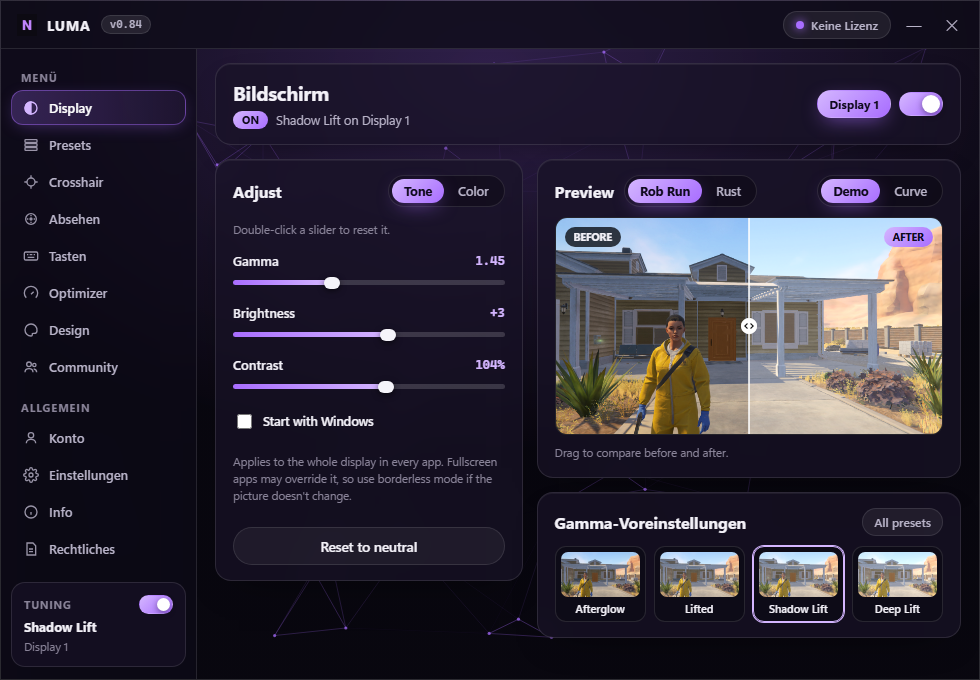
Try it: drag the sliders or the comparison line. Use the menu and the tabs to look around: Color, Tone, Presets, Crosshair and Optimizer (try Optimize all). Double-click a slider to reset it.
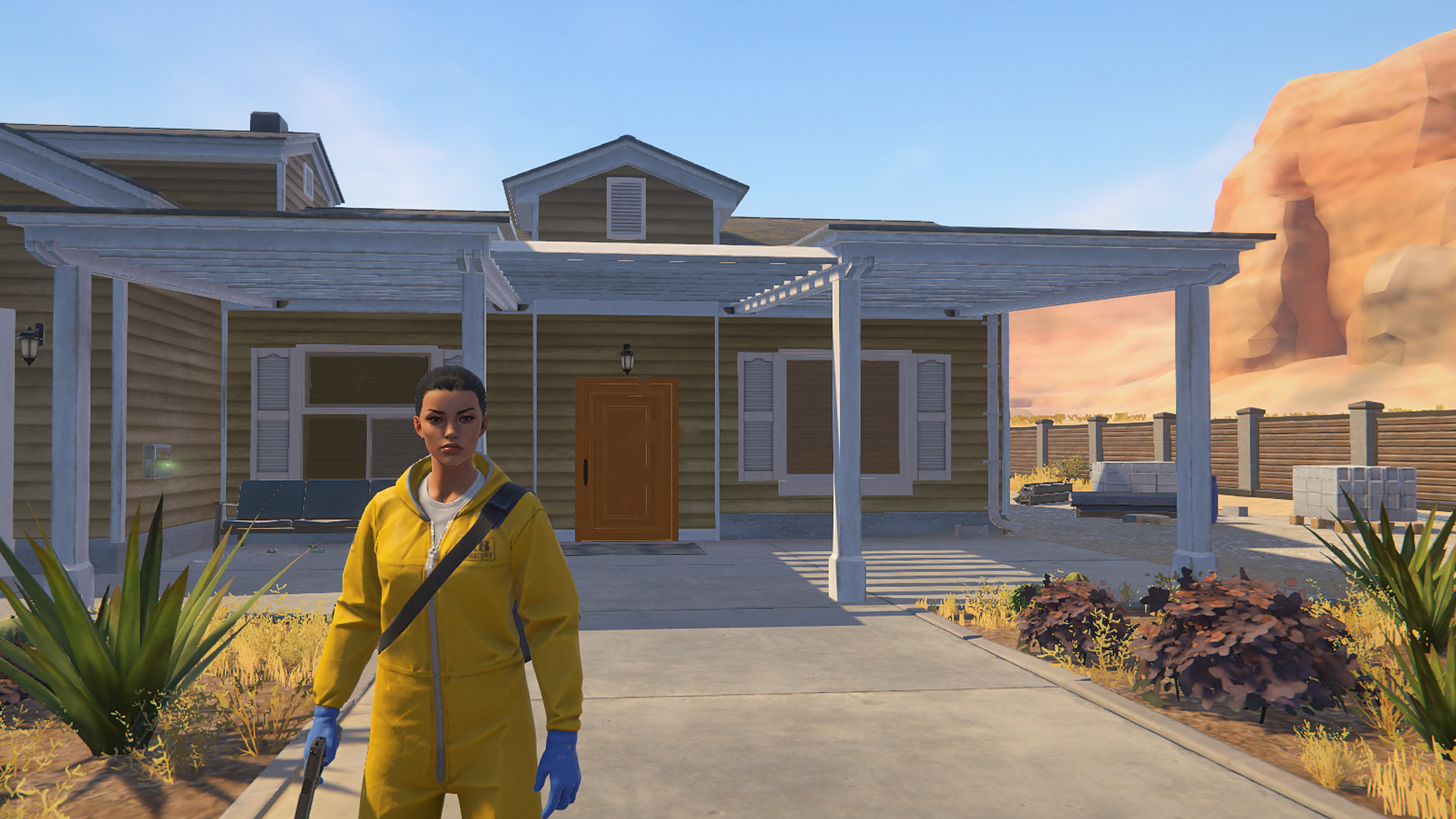
The dark and bright reference pictures are used throughout this site, including inside the app previews.
- Gamma
- 0.60 – 3.00
- Saturation
- 0 – 350%
- Crosshair designs
- 10 + yours
- Built-in presets
- 27
Compare
Luma vs ReShade vs NVIDIA App.
What each one does for how your game looks.
| Feature | Luma | ReShade | NVIDIA App |
|---|---|---|---|
| Changes how games look | Every game | Per game | Supported games |
| Nothing loaded into the game | Loads a DLL | ||
| Games with anti-cheat | Never touches the game | Can be flagged | Limited |
| Works on AMD and Intel | |||
| Gamma and night presets | 27 built in | Needs shaders | Slider only |
| Switch looks with a key | |||
| Crosshair overlay | |||
| PC optimizer | Undo all | Game settings | |
| Setup | One app | Per game |
YesPartlyNo
Your download
Luma is ready.
This download is shown only after an active trial or lifetime license is verified. Install it, then log in with this same account.
Live demo
Drag the line. Move the sliders.
Your browser only changes the picture below, while Luma changes your whole display. Gamma, brightness, contrast and saturation use the app's math. Vibrance needs an NVIDIA card, and here it is an estimate.
BEFOREAFTER
The demo uses the same dark and bright reference pictures shown in the app previews.
Input brightness on the bottom, output on the side. The dashed line means no change.
Community
Join the Luma Community
Join the Luma community for support, updates, presets and exclusive announcements.
Pricing
Pick how you pay.
Monthly
4 days free, then monthly until you cancel. One free trial per account.
- Cancel anytime, and you keep access until the paid month ends
- Updates included through the app
- One PC per account, and you can move it every 7 days
- 14-day refund on your first payment if it isn't for you
Lifetime best value
One payment, yours to keep. No subscription.
- Pay once, and it never renews
- Updates included through the app
- One PC per account, and you can move it every 7 days
- 14-day refund if it isn't for you
Secure checkout by Stripe. Your card details go directly to Stripe and never reach Luma. Tax is included, and your receipt comes by email from Stripe.
You need an account to buy, and your plan goes on it. Windows 64-bit only.
Payment
PayPal or Paysafecard.
PayPal is confirmed by PayPal. Paysafecard waits for an administrator. No license key is created for an unverified payment.
Tuning
Each screen gets its own settings.
Tone and color sit on separate tabs, with a before and after view that updates while you drag. Gamma reaches 3.00, RGB reaches 20–180%, and Hue rotates from -180° to +180°. Quit Luma and your original colors come back.
- Green NVG and Blue NVG use Gamma 3.00 and can be held with a bind on one selected screen
- Green True Black and Red Black Holo (Rust only) map the selected sight color toward true black without a capture loop
- Ultra Zoom magnifies the center of one selected screen while its keyboard or Mouse 1–5 bind is held
- Saturation works on any graphics card; Vibrance uses the NVIDIA driver's own control
Presets
Gamma presets and color presets.
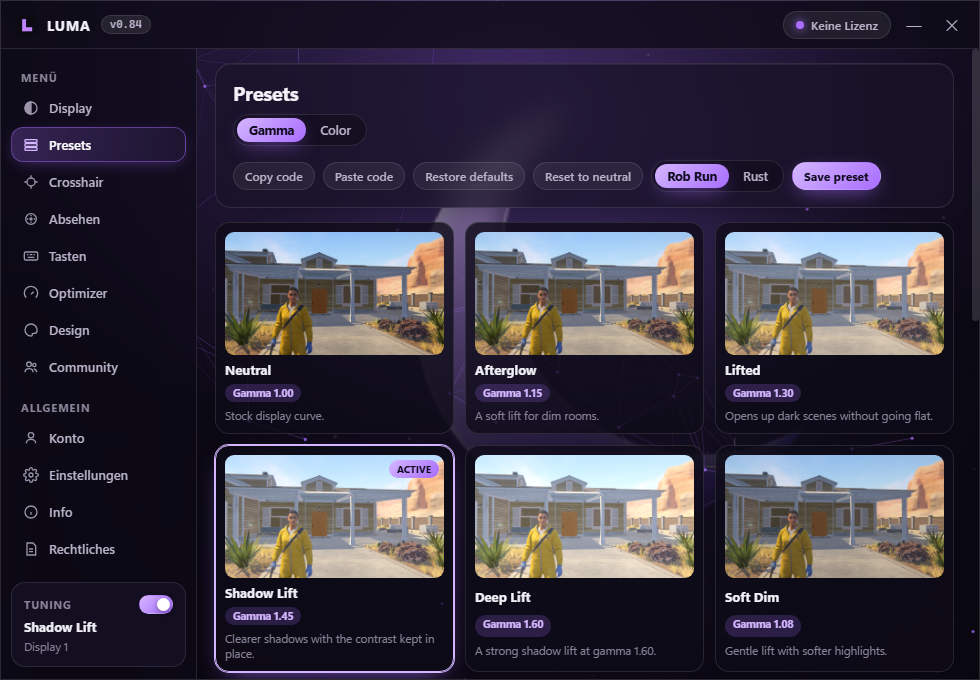
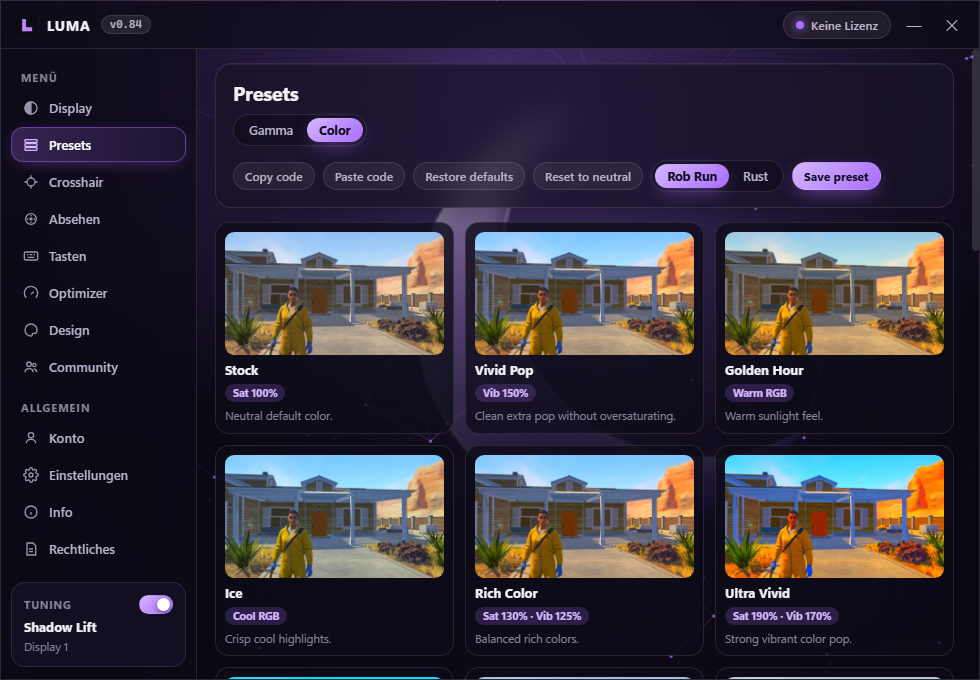
The app has 15 gamma presets and 22 color presets. A card applies that look. Restore defaults brings built-ins back and keeps your own presets.
Optimizer
Real Windows tweaks. One click to undo.
Optimize all switches on the Windows settings that actually matter for games. Luma saves what you had before, so Undo all puts your PC back exactly as it was. Nothing here touches the game itself.
- High performance power plan keeps the CPU at full speed for steadier frame times
- Game Mode gives the game you're playing first claim on CPU and GPU time
- Background recording off stops Xbox Game Bar from recording clips while you play
- Windowed game boost turns on the flip model for borderless games: lower input delay
- Mouse acceleration off for 1:1 aim, and no Sticky Keys window when you spam Shift
- Notifications, background apps, transparency and animations off for a quieter, lighter PC
- Clean temp files removes old files from your own Temp folder and skips anything in use
Crosshair
Build one here. Paste the code in the app.
Pick a design and a color. The code below is a real Luma share code, so a friend can paste it and get the same crosshair. The optional global toggle is Ctrl+Alt+Shift+F11 and ignores key repeat, so a held shortcut cannot switch it off by accident.
The app adds sliders for ring, arm length, gap, thickness, dot, outline and opacity. It has room for 8 saved crosshairs, and color presets get share codes too.
Themes
Make the app yours.
Choose the accent color and how much the Geometry effect moves behind the glass. In the app you can also use your own picture. This page does not use the old moon mark.
Display Tuning
Details
The exact ranges.
- Gamma
- 0.60 – 3.00
- Saturation, all screens
- 0 – 350%
- Brightness
- -20 – +20
- Vibrance, NVIDIA (200 – 250% on any card)
- 0 – 250%
- Contrast
- 70 – 130%
- Red, green, blue
- 20 – 180%
- Hue
- -180° – +180°
- Shortcut inputs
- Keyboard + Mouse 1–5
- System
- Windows, 64-bit
- Login
- Email or Discord
What's new
Recent versions.
- 0.83
The crosshair stays centred on stretched resolutions (1440×1080 and others).
- 0.82
The 9 colour-graded presets are about 1.6× stronger, Lavender Sky most of all.
- 0.81
Look Wheel: hold F7 in game, point at a look and let go. 9 new colour-graded presets, made like real color grading: 4K Quality, Lavender Sky, Teal & Orange, Golden Sunset, Night Drive, Alien Sky, Matte Film, Ice Cold and Vintage Film. Community presets now have Copy code.
- 0.80
Saturation now goes up to 350% and Vibrance up to 250%. NVIDIA vibrance is already at its maximum at 200%, so 200 – 250% adds the extra colour on any graphics card.
- 0.79
Pick which screen the crosshair is on, right on the Crosshair page. Switching display on the Display page now moves the crosshair too.
- 0.78
New Optimizer page with ten real Windows tweaks: High performance power plan, Game Mode, background recording off, windowed game boost, mouse acceleration off, Sticky Keys popup off, notifications off, background apps off, transparency off, window animations off, plus temp cleanup. Optimize all in one click, Undo all puts everything back. Reticle now says it is for Rust only.
- 0.77
Pick your game: Rob Run or Rust. Presets, Community and the preview follow the game you pick. NVG tools only show under Rust. FxSound and Louder Footsteps are removed, so setup no longer asks for administrator access.
- 0.76
Desert Glow now matches the ReShade look: deep blue sky and darker orange sand. The preview shows Rob Run by default (switch to Rust above the preview), and the app opens on the Color tab.
- 0.75
New color preset Desert Glow: a ReShade-style look for Rob Run with a blue sky and warm orange sand, without ReShade.
- 0.73
Color keys: Binds now has a Colors tab with Tuning On/Off and four keys that each switch to a preset you pick, or your current look. Press the same key again to go back.
- 0.72
New Tuning On/Off bind: one key switches your current gamma and color settings off and back on, so you can compare in game.
- 0.71
Vibrance now rises from the level your NVIDIA driver already has, so moving the slider up always makes colors stronger. A crash or forced close can no longer leave vibrance stuck.
- 0.70
The animated Night Moon is the new default background, and your own animated GIFs can be used as backgrounds.
- 0.69
FxSound stays off until your own bind, and Discord login returns to Luma by itself.
- 0.68
Audio has no default key. FxSound starts only after you choose and press a Footsteps bind, and website login now returns to Luma automatically.
- 0.62
H now toggles the selected audio profile on and fully off. FxSound's exact AGPL source and separate third-party rights are documented.
- 0.61
Luma Setup now includes the official signed FxSound installer as an optional component.
- 0.60
Binds now shows the required FxSound Audio Enhancer routing step and adds a selectable Bass + Headshots profile beside Footsteps.
- 0.59
Louder Footsteps now uses FxSound instead of the previous audio fallback. Luma can install it, apply a focused footsteps EQ from the bind, and restore the previous FxSound preset.
- 0.58
Added an installable audio fallback for drivers without Windows Loudness or EQ controls.
- 0.57
Reticle now uses the Rust-style closed holo ring with a centre dot and four short inner marks.
- 0.56
Reticle Preview now uses real green and red in-game holo images, Orange is removed as a base, and Ultra Zoom updates more clearly. Unsupported Footsteps drivers now show a clean status.
- 0.55
Reticle has a distinct holo-sight icon. Green/Blue NVG and NVG Hold are brighter and more reliable, while Louder Footsteps can use supported hardware tone controls.
- 0.54
Community Publish now works with Color edits while Gamma or NVG is active. Ultra Zoom is clearer and lighter, and Cartoony Look adds a Hue -14 preset.
- 0.53
Share named display presets in Community. Discord login now has an Open Luma return page and a manual return-link option for Edge. NVG Hold uses one display-ramp change per press.
- 0.50
Gamma reaches 3.00. Green and Blue NVG, Green True Black, Red Black Holo, Hue, Ultra Zoom, Louder Footsteps, per-screen binds and Mouse 1–5 support are included.
- 0.36
The color preset list scrolls and holds up to 40 presets.
- 0.35
The crosshair shortcut is off unless you turn it on, so no key in a game can hide it. New Violet and Twilight presets.
- 0.34
Seven new color presets: Cool Film, Sunset, Frost, Retro Film, Rose, Faded and Punch.
- 0.33
The crosshair stays centered and on top when a game changes the screen.
- 0.32
Stronger license protection.
- 0.30
Luma now needs an active subscription or license.
- 0.29
New Noir color preset, and a black crosshair color.
- 0.28
Log in with Discord or your Luma account, and turn on two-factor login in Settings.
- 0.27
Larger preset cards with descriptions and stronger green and blue looks.
- 0.23
Four new dark presets with green and blue tones: Deep Forest, Emerald Night, Midnight Blue and Deep Sea.
- 0.22
The version number now sits next to the name, and new versions are found right away.
- 0.21
Larger effect cards on the Theme page.
- 0.20
One account works on one PC, and you can move it to another once every 7 days.
- 0.19
Plus icons now sit in the exact center.
- 0.18
Log in with Discord. Luma can now update itself when it opens.
- 0.17
Saturation up to 300%. New crosshair page, share codes, separate gamma and color presets, Restore defaults and a real Windows setup.
Limits
What Luma doesn't do.
- It doesn't touch your games.Luma never reads or changes game files or game memory.
- Gamma goes up to 3.00.Very high values intentionally lift dark scenes strongly and can wash out bright scenes.
- Exclusive fullscreen can override it.Use borderless mode if the picture doesn't change. The crosshair also needs borderless or windowed mode.
- Vibrance up to 200% needs an NVIDIA card.200 – 250% and everything else works on any graphics card.
Security
Not a virus. Checked every release.
Luma is a normal Windows app. It changes your display with the same Windows and NVIDIA settings that GPU tools use. It never touches your games.
Security check passed for 0.83An automatic test opens every release and blocks it if it can inject, read other programs, hook the keyboard or load a driver.
- No inject, no DLLNo code is put into games or other programs.
- No game memoryLuma never reads or changes another program's memory or files.
- No keyloggerOnly the keys you bind are checked. Nothing is saved or sent.
- No driver, no adminRuns as a normal app. No kernel driver and no service.
- Safe updatesAn update only runs after you click it and its SHA-256 matches.
- Only our serversHTTPS to luma-hq.de for login, licence and updates. Nothing else.
The VirusTotal button opens the live scan of the exact file you download. 69 of 70 antivirus engines find nothing. The one hit is Trapmine’s machine-learning guess (“Malicious.high.ml.score”), a known false positive for new apps that aren’t code-signed yet, and it has been reported to Trapmine. Windows may show “Windows protected your PC” because Luma is new and not code-signed yet. That is not a virus warning: click More info, then Run anyway.
FAQ
Common questions.
How do I get Luma?
Create an account or log in with Discord, then start your 2 free days or buy Lifetime under Pricing. The download button appears only after the site verifies an active license. The installer still requires that licensed account when Luma opens.
How do I cancel or get a refund?
Log in here, open your account and press Manage or cancel subscription, or use this cancel page. Enter the email you paid with and cancel in one click. It works the same whether you paid with card, Google Pay, Apple Pay, Cash App or Link, and you keep access until the paid month ends. For a refund, use Discord support. A postal or email imprint is not published here until you add your own legal contact.
How do I contact you?
Support über unseren offiziellen LUMA Discord erhalten. Discord Support öffnen
Are crosshair overlays and screen filters allowed in games?
That depends on the game. Some games ban crosshair overlays or display filters in their rules, so check the rules for the games you play. Luma doesn't bypass anti-cheat.
Windows or my antivirus shows a warning. Why?
Luma isn't code-signed yet, and new unsigned apps often trigger warnings. Signing is planned. Only download Luma from this site or the official Discord. See the security check, file fingerprints and VirusTotal results.
Why does it only work on one PC?
Each account is tied to one PC so accounts can't be shared. If you change PC, log in there and choose Move to this PC. You can do that once every 7 days.
Will it change my colors permanently?
No. Turn Luma off or quit it and your original colors return.
Do I have to download every new version?
No. After the first install, Luma tells you when an update is ready, installs it and restarts by itself.
Thank you
You're in.
Install Luma, then log in with the same account. Your 2 free days have started, and Stripe will email you the details.
Download LumaLegal
Terms
Luma is licensed to you for personal use, on one PC per account. You may not resell it, share your account, or try to get around its license checks.
Luma 0.76 and earlier could install FxSound, a separate optional component distributed under AGPLv3. Luma's subscription and resale restrictions do not restrict your AGPL rights in FxSound. Its exact application source, audio-driver source and license remain available without charge. Luma is not affiliated with or endorsed by FxSound, LLC.
You are responsible for following the rules of the games and services you use it with. Luma is provided as it is, to the extent the law allows.
Luma is a monthly subscription after a 2-day free trial. It renews each month until you cancel, and your card is charged when the trial ends unless you cancel first. The free trial is once per person: if the same account, email, card or Cash App account already had a trial, the first month is charged right away.
Last updated 6 November 2026.
Privacy
When you log in, we store your email, your Discord user details if you use Discord, your license status, your PC's name, and a scrambled ID of your PC. We use them to run your account and enforce the one-PC limit. Passwords are stored scrambled by Supabase, and we can't read them. Your Luma settings stay on your PC.
Our login and database run on Supabase. Payments are handled by Stripe, and we only keep the payment reference, never your card details. This site loads fonts from Google. If you log in with Discord, you also join our Discord server, and buyers get a buyer role there. You can leave the server at any time. You can ask us to delete your account at any time through our Discord.
Refunds
You can ask for a full refund within 14 days of your first payment. A refund ends your subscription and the license on your account. You can cancel at any time from your account on this site or the cancel page, and you keep access until the paid month ends. Questions: Discord Support öffnen.
This doesn't affect any rights you have under the law where you live.